I’ve worked closely with business leaders, founders, executives, startup warriors, and there’s one struggle they all quietly share:
Presentations.
Not the giving part (most CEOs I’ve met can command a room), but the building part, the late nights shaping strategy into slides, the last-minute design tweaks, the nagging worry that a missed detail could derail a pitch.
I’ve sat beside leaders trying to convert spreadsheet chaos into crisp slides before board meetings. I’ve watched them write, delete, rewrite headlines, only to stress over fonts and margins next. It’s exhausting just thinking about it.
That’s why what’s happening with AI right now? It’s a total game-changer.
How Executive Presentations Used to Work
Let’s rewind for a sec. A typical high-stakes presentation used to take:
- Hours of data gathering
- Input from design, strategy, comms, even legal
- Dozens of back-and-forth revisions
- And often... last-minute panic over “just one more change”
This wasn’t just about making slides, it was project management with a deadline no one could move.
But now? AI is streamlining the whole thing.
What’s Changed, and Why It Matters for CEOs

1. Time Is No Longer the Enemy
AI tools (yes, like the one I’ll mention in a second) can whip up an entire presentation draft in minutes. That means more time for CEOs to focus on decisions, not deck formatting.
What used to take a week? Now it’s closer to your next coffee break.
2. Data Comes Alive
One exec I worked with recently plugged a few bullet points into a tool, and it came back with not only slide headlines, but charts pulled from real-time market data. Visuals that looked like they took hours? Done in seconds.
No more stale slides. Just fresh, data-driven content that actually supports decisions.
3. Brand Looks Are Baked In
No more worrying if your pitch deck matches your investor update in tone or design. These AI platforms keep everything on-brand, whether it’s colors, fonts, logos, or layout.
Even if the content shifts, the identity stays sharp.
4. Personalized Like a Handwritten Note
Here’s what surprised me most: these tools aren’t just fast, they’re thoughtful. They can adapt tone, simplify language for non-technical audiences, and even tweak content for specific stakeholders (like investors vs. internal leads).
It’s not perfect, but it’s very close.
What I Use (and Recommend Quietly to Founders)
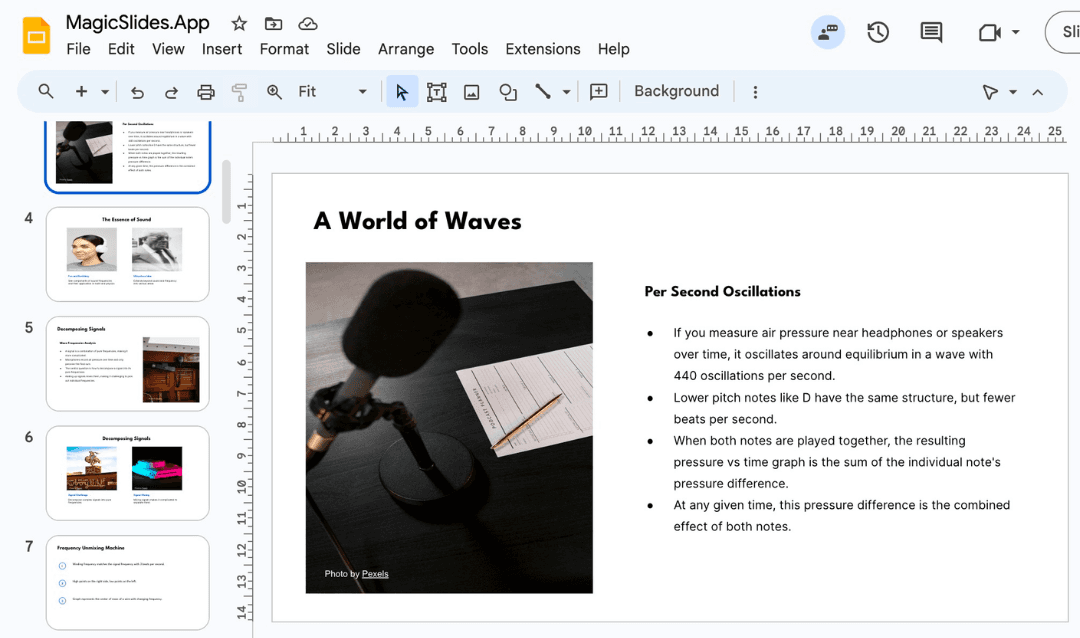
There’s one platform I’ve seen do this especially well: MagicSlides.app.
It’s not loud, not flashy, but boy, does it get the job done.
You enter a topic like “Q2 Growth Strategy” or “Fundraising Deck for Series B.”
You select the number of slides, choose a clean template, maybe throw in a note or two about what matters most, and let the AI go to work.
Minutes later? A polished, customizable deck. You can still tweak and tailor it, but the hard part? Already done.
Quick Walkthrough: How It Works (No Tech Skills Needed)
- Head to MagicSlides.app and log in

- Type your topic, be specific (e.g., “SaaS retention trends Q1 2025”)

- Click "Generate" and let the magic happen

- Pick a template, choose slide count

- Add extra details if needed, like your target audience or tone

- Generate again, and voila, deck delivered
- Download or edit inside Google Slides or PowerPoint

It’s shockingly intuitive, even for non-design folks.
Where This Really Shines for CEOs

I’ve seen leaders use this in ways that genuinely save the day:
- Board Meetings: Clean data visuals, structured narratives, no time wasted
- Investor Decks: Focused, polished, and personalized for specific firms
- Internal Updates: Strategic clarity, without having to brief a whole team
- Partnership Pitches: Highlighting shared value and market potential, fast
And the best part? It still leaves room for that final CEO magic touch, that one bold slide or story that makes people lean in.
Final Thoughts from a Writer in the Room
Look, I’m not a CEO. But I’ve helped many build the stories they tell.
I’ve seen them stressed at 1 a.m. over slide #12. I’ve seen the joy on their faces when things finally click. And now, I’m seeing something new: relief, because AI is finally lifting some of that weight off their shoulders.
If you’re a leader reading this, you don’t need to outsource your vision, you just need a little help getting it on the screen.
And if you’ve ever wished for “one less thing” to worry about before a big meeting?
This might be it.
Create PPT using AI
Just Enter Topic, Youtube URL, PDF, or Text to get a beautiful PPT in seconds. Use the bulb for AI suggestions.
character count: 0/ 6000 (we can fetch data from google)
upload pdf, docx, .png
less than 2 min